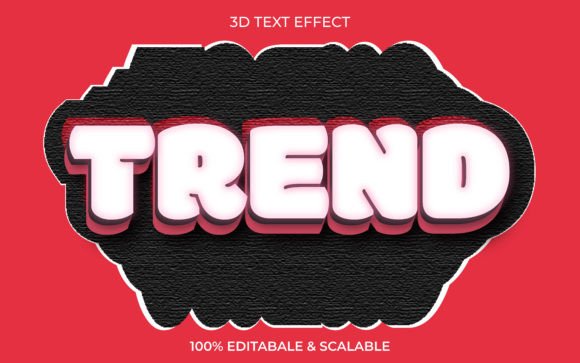
Streamlining Visual Branding with the Trend 3D Text Effect Style Mockup
In the fast-paced world of digital marketing and print-on-demand, visual consistency is not just an aesthetic choice; it is a business imperative. Whether you are designing a book cover for Kindle Direct Publishing, creating web banners for a seasonal campaign, or developing branding materials for a new startup, the quality of your typography can make or break user engagement. This is where the Trend 3D Text Effect Style Mockup becomes an essential asset in your creative toolkit. It bridges the gap between complex 3D modeling software and efficient graphic design, allowing creators to produce high-impact visuals without the steep learning curve typically associated with three-dimensional rendering.
Integrating 3D Typography into Your Workflow
Traditionally, achieving realistic 3D text effects required hours of work in specialized software like Blender or Cinema 4D. For many entrepreneurs, marketers, and freelancers, this time investment is prohibitive. The Trend 3D Text Effect Style Mockup changes this dynamic by offering a streamlined process that fits seamlessly into existing design workflows. It serves as a bridge between concept and final output, allowing you to visualize how your specific copy will look in a polished, professional environment before committing to final production.
This tool is particularly valuable during the prototyping phase of a project. When you are brainstorming ideas for a website header or a social media ad, being able to instantly swap out text and see the result in high-quality 3D allows for rapid iteration. You can test different headlines, fonts, and color schemes in minutes rather than days. This agility supports better decision-making, ensuring that the final design aligns with your brand identity and marketing goals.
Key Features That Enhance Efficiency
The utility of this mockup lies in its technical specifications and user-friendly design. Understanding these features helps you maximize its potential across various projects.
- Smart Object Replacement: This is the core functionality that drives efficiency. By utilizing Photoshop’s Smart Object layers, you can double-click the layer, type your desired text, save, and watch the mockup update automatically. This eliminates the need for manual masking or perspective adjustments.
- 100 Editable Fonts and Words: Flexibility is crucial for diverse projects. With support for 100 editable fonts, you are not locked into a single typographic style. Whether you need a bold sans-serif for a tech product or an elegant serif for a romance novel cover, the mockup adapts to your choice.
- No Skill Requirement: The design is structured so that advanced graphic design skills are unnecessary. If you can open a file and type text, you can use this tool. This democratizes high-end design, making it accessible to bloggers, small business owners, and educators who may not have formal training in Adobe Creative Cloud.
- High-Quality Resolution: Delivering files at 300 DPI ensures that the output is crisp and clear, suitable for both digital displays and high-resolution print materials. This versatility means you can use the same asset for a web banner and a physical flyer without worrying about pixelation.
Practical Applications Across Industries
The versatility of the Trend 3D Text Effect Style Mockup allows it to serve multiple roles within different professional contexts. Here is how various users can integrate this resource into their daily operations.
For Print-on-Demand and KDP Authors
Book cover design is highly competitive. A title that pops off the page can significantly influence click-through rates on platforms like Amazon KDP. Using this mockup, authors can experiment with 3D title treatments that convey genre and tone effectively. Because the files include EPS, JPG, and PNG formats, you can easily extract the text element to place over custom backgrounds or illustrations, ensuring your cover stands out in thumbnail views.
For Digital Marketers and Web Designers
In digital advertising, attention spans are short. 3D text adds depth and realism that flat design often lacks. Marketers can use this mockup to create eye-catching headers for landing pages or social media posts. The ability to quickly edit words means you can A/B test different value propositions with consistent visual styling, helping you determine which messaging resonates best with your audience.
For Corporate Branding and Presentations
Small business owners and corporate trainers often need to create professional-looking presentation slides or internal marketing materials. Instead of relying on generic clip art, using a customized 3D text effect adds a layer of polish and professionalism. It helps reinforce brand authority and makes complex information more engaging through visual hierarchy.
Technical Compatibility and File Management
To ensure smooth integration into your workflow, it is important to understand the file structure included in the download. The package comes as a .zip file containing essential support files: one EPS file, one JPG, one PNG, and a Help File.
The EPS file is vector-based, allowing for infinite scalability without loss of quality. This is ideal if you need to resize the text effect for large-format printing, such as banners or signage. The JPG and PNG files provide rasterized versions that are ready for immediate use in web projects or documents where editing is not required. The inclusion of a Help File ensures that even first-time users can navigate the setup process without frustration, reducing downtime and technical support queries.
Organization is key when managing design assets. We recommend creating a dedicated folder for your mockups and labeling them clearly by style or project type. Since all words and fonts are fully editable, keep a record of the font licenses you use to ensure compliance with commercial usage rights, especially for client work.
Quality Control and Consistency
While the tool simplifies the creation process, maintaining quality control remains the designer’s responsibility. Always check the legibility of your text after applying the 3D effect. Some decorative fonts may become difficult to read when extruded or shadowed. Use the preview features in your design software to zoom in and inspect edges and lighting effects.
Consistency across your brand materials is another critical factor. If you use this 3D style for a book cover, consider using similar lighting and angle settings for related promotional graphics. This creates a cohesive visual language that helps audiences recognize your brand instantly. The Trend 3D Text Effect Style Mockup supports this by providing a stable base structure that remains consistent regardless of the text content.
Maximizing Long-Term Value
Investing in high-quality mockups is a strategic move for long-term productivity. Unlike custom 3D rendering services that charge per project, this mockup offers unlimited use. Over time, the cost savings become significant, especially for freelancers and agencies handling multiple clients. Furthermore, the ease of use means you can delegate simple text updates to junior staff or virtual assistants, freeing up senior designers to focus on more complex creative tasks.
As design trends evolve, having a library of versatile, high-quality assets allows you to adapt quickly. The 3D text trend is currently prominent in modern UI/UX design and social media aesthetics. By mastering this tool now, you position yourself to meet current market demands efficiently.
Final Thoughts on Implementation
The Trend 3D Text Effect Style Mockup is more than just a design template; it is a productivity enhancer that simplifies complex visual tasks. By removing technical barriers and providing high-resolution, editable outputs, it empowers creators to focus on message and strategy rather than mechanics. Whether you are launching a new product, publishing a book, or refreshing your brand identity, this tool offers a reliable, professional solution.
Remember, the goal of any design asset is to communicate effectively. Use this mockup to highlight your key messages, maintain visual consistency, and elevate the perceived value of your work. If you encounter any issues during implementation or have specific questions about customization, do not hesitate to reach out for support. Proper utilization of these resources can transform your creative workflow, delivering better results in less time.